
Lee County VINELink Coverage
Florida participates in VINE, the Victim Information and Notification Everyday service, through VINELink. Florida Department of Corrections materials state that FDC and all 67 county jails participate. That includes the Lee County jail system. Access begins at the Florida VINELink service, the national VINELink entry, or the Florida VINE phone line at 1-877-846-3435.
VINE is a notification layer. It receives custody events from a participating agency. It is not the original jail ledger, state corrections file, or court docket. A Lee County result can reflect an LCSO booking, while an FDC result concerns state prison or state supervision data. The custodian shown on the match determines which agency should confirm the event.
Coverage follows the custody record, not the county where the court case began. A Lee County defendant sent to an FDC prison elsewhere in Florida should be checked under the state record after transfer. The LCSO entry still documents departure from county custody. VINELink may carry notices from both systems, but each event must be matched to the agency named in the result. This avoids reading a county transfer as a completed state release.
The official Florida VINELink landing page appears in the captured interface below.
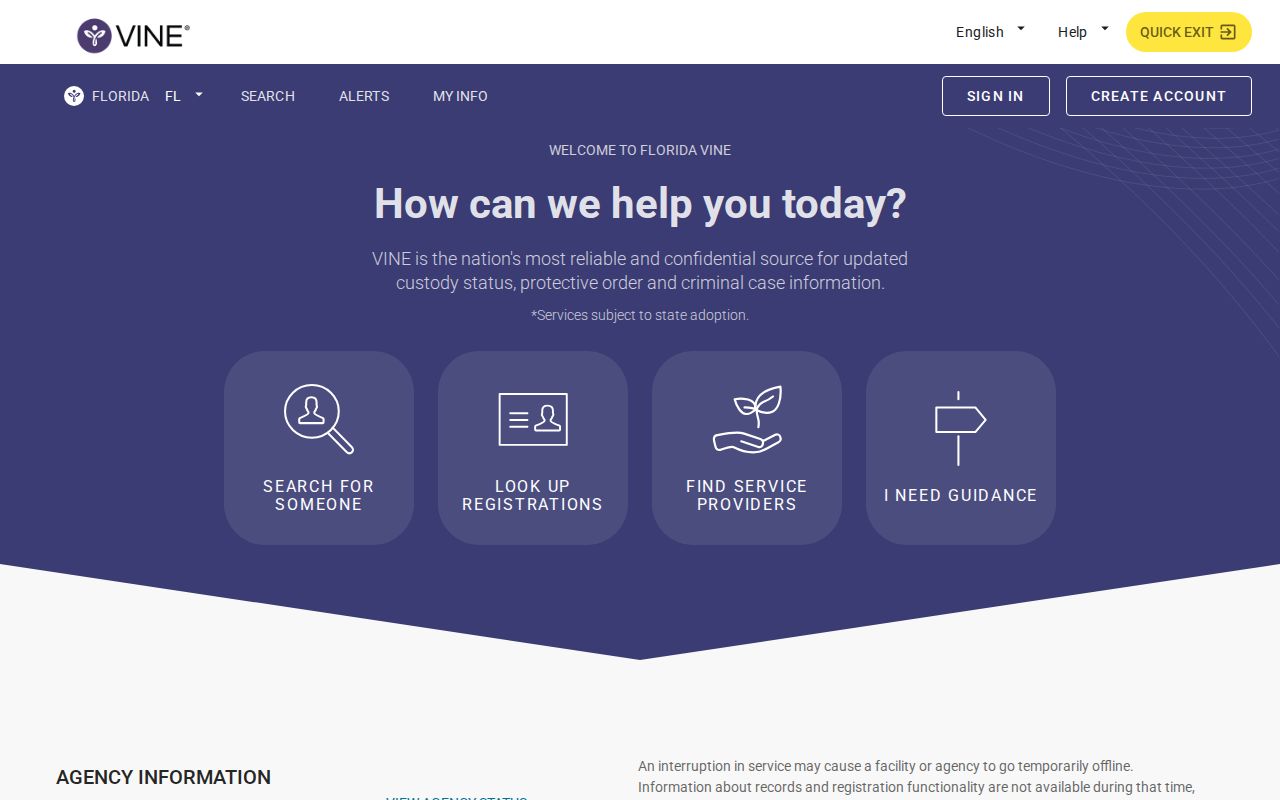
The live service can change its controls, but the state selection and person-specific search remain the essential starting points.
Search Lee County VINELink Records
Use the strongest identifier available. A booking number is useful for an LCSO record, while a DC number belongs to FDC. A full name can return more than one match. Before opening notification controls, compare the name, age or date of birth when shown, identifying number, and custodian. Do not choose a record merely because the name looks close.
- Open VINELink and select Florida as the state.
- Choose the offender or custody search offered by the current interface.
- Enter the full name, then add a booking or offender identifier when available.
- Review all matches and compare identity details plus the listed custodian.
- Open only the confirmed individual record and copy its exact status and event wording.
- If no match appears, retry verified spelling and then check the responsible agency record.
A no-result screen does not prove release. Spelling, a transfer, feed timing, and archival limits can all affect a search. The person may also belong to a system outside VINE coverage. For a named-person search that crosses county, state, court, and federal sources, use the Lee County release records search path.
When a common name produces several records, do not rely on a photograph alone. Compare the booking or DC number and the agency. A county booking number and an FDC DC number are different identifiers. If the matching fields remain uncertain, stop before registering and check LCSO or FDC directly. An alert on the wrong person can cause needless confusion and will not help resolve the intended custody question.
Note: Registration must attach to the correct individual custody record, so complete the identity and custodian check before choosing an alert.
Lee County VINELink Release Fields
A released result can show a status such as released or out of custody and a custody-event date, depending on the agency feed. Copy the language exactly. VINELink does not decide guilt, provide the full judicial result, or explain each release reason. “Out of custody” from LCSO can also precede state, federal, another county’s, or immigration custody.
| Field | What it can establish |
|---|---|
| Name | The person attached to the participating custody record. |
| Offender or booking ID | A structured key for matching the correct agency record. |
| Custodian or facility | Which participating agency supplied the event. |
| Custody status | The exact in-custody, released, or out-of-custody wording supplied. |
| Event date | The date tied to the reported status or custody change when displayed. |
| Notification control | The route to register for changes on that person and record. |
A projected date is not an actual release. FDC may publish a Current Release Date that remains subject to change, while VINE waits for a custody event. After a release notice, confirm a Lee County jail movement in LCSO Arrest Search and a state-prison movement in the FDC Offender Information Network.
VINELink may not display the full release code, destination, charges, sentence structure, or court order. Those omissions are normal because the service is built for status and notice. For an LCSO event, the expanded booking can add the booking number, release timestamp, and case information. For an FDC event, the released-inmate record can preserve the DC number, offense and sentence data, and release details. Use the court docket to explain the legal result.
Set Lee County Release Alerts
Notification registration begins from the confirmed person’s result. Available channels can vary by interface and record. Florida research documents telephone, text, and email paths. Enter contact information only into the live VINELink form. Never place personal registration data in a public screenshot or message.
- Open the verified individual record and select its notify or register control.
- Choose each contact channel currently offered, such as phone, text, or email.
- Enter the destination and complete the service’s verification step.
- For a telephone alert, choose the requested four-digit PIN.
- Finish any email link, text code, or other confirmation shown.
- Save the registration confirmation and register again if a transfer creates a new custody record.
FDC’s official VINE form explains a key phone rule. Telephone notifications continue until the recipient enters the four-digit PIN. If no PIN is selected, the system may use the last four digits of the phone number. Text and email notices do not repeat in that same phone-acknowledgment pattern. The PIN acknowledges the call; it is not proof of the registrant’s identity.
Keep the contact channel current. Registration is tied to one person and custody record. A transfer can change the data source or create another record, so recheck the service after any movement.
Save the confirmation in a private place. It can help identify which record and channel were registered if an expected message does not arrive. Registration should never replace direct contact in an urgent situation. Feed updates, phone service, email filtering, or a changed custody record can affect delivery even when the original sign-up was completed correctly.
Read Lee County VINE Alerts
A notification reports a custody change sent by the participating agency. It can be delayed, corrected, or describe a transfer out of one custodian. Do not translate the alert into a release reason that it does not name. A jail exit after bond, time served, dismissal, court order, or transfer can produce different legal and practical outcomes even when each ends the same LCSO booking.
| Alert or status | Next confirmation |
|---|---|
| LCSO release or out of custody | Check LCSO Arrest Search and, if needed, Central Records. |
| FDC release | Open the FDC released-inmate or release-information record. |
| Transfer | Identify and check the receiving custodian. |
| Projected event | Wait for the actual agency release entry and do not treat the date as final. |
The Lee Clerk supplies the criminal case result. A VINELink notice cannot establish dismissal, conviction, sentence completion, or the end of supervision. If an alert matters for court or records purposes, preserve the VINELink message and obtain the corresponding source record.
A person can leave an institution and remain under community supervision. FDC separates released-inmate data from its Community Supervision search. If a state release is followed by probation, parole, conditional release, or another supervised status, check that database and match the DC number. VINELink’s release event should not be read as discharge from every legal obligation.
Lee County VINE Verification Layer
Lee County does not appear to operate a separately branded SAVIN portal. LCSO victim-rights material routes users to Florida VINE. It also offers two direct local checks: Corrections at 239-477-1500 and Arrest Search by name or date of birth. That two-source local layer is useful when an automated event seems late or unclear.
First open LCSO Arrest Search and inspect the matching booking status and release timestamp. For an immediate custody question, call Corrections. For a durable written answer, request the booking or custody-movement record from Central Records. The request should identify the person and booking and ask for recorded release date, time, type or destination.
LCSO’s Victim Advocates information supports local routing, while Florida VINE handles the automated notification. These channels complement each other. Neither turns an unverified message into proof of the reason for release.
Lee County VINELink Search Limits
VINELink does not cover federal BOP custody. A person who served a federal prison sentence belongs in the BOP Inmate Locator. A federal result can show a release date and a status such as Released or Not in BOP Custody, but that resolves only BOP custody. It does not rule out state, local, immigration, or federal pretrial custody.
ICE also has its own locator. It is not part of VINELink. Transfers can create a gap in what one system shows, and ICE’s release coverage is limited rather than a permanent history. Use those tools only when the case facts or destination point to the relevant federal custodian.
- Custodian
- The agency currently responsible for holding or tracking the person’s custody record.
- Release
- Exit from one custodian, sometimes to another agency rather than the community.
- Transfer
- A custody handoff that can require a new search or alert registration.
- Discharge
- The end of the legal custody or supervision covered by the issuing agency’s record.
VINE works best as an early warning tool tied to one verified person. Agency searches and records requests remain the sound way to confirm what happened and which office now controls the record.
For older events, request the source record instead of expecting VINELink to act as a permanent history. LCSO Central Records can address a county booking and release movement. FDC public records can address a state release or discharge document when the online offender result is incomplete. Give the booking or DC number so the agency can locate the correct file.